Turn Your Photo Into a Simpsons Scene
Recreates your uploaded photo as a believable still from classic The Simpsons, converting every person and any animals while preserving the exact count, poses, and composition. Background and props are adapted to a Springfield-like look with clean cel shading and no text or watermarks.
Content
Use the uploaded photo as the ONLY reference for composition and subjects. Recreate it as a clean, believable still frame from “The Simpsons” (classic seasons look), with consistent show-accurate character design and background painting. Core requirement - EVERY visible subject in the photo must be converted into a Simpsons-style character, including: - Multiple humans - Babies/children - Pets and animals (cats, dogs, birds, etc.) - Do not keep any subject photorealistic. No “half-real, half-cartoon” results. Identity and count lock - Keep the exact number of humans and animals. - Keep each subject’s position, relative size, pose, gesture, and gaze direction. - Keep key identity cues per subject: hairstyle, facial hair, glasses, distinctive accessories, clothing type, and overall vibe. - Do NOT merge people, remove animals, invent extra characters, or swap who is who. Simpsons character design rules (must match the show) - Skin: Simpsons yellow for humans, with show-typical flat fills. - Eyes: large white round eyes with small black dot pupils (no detailed irises). - Nose: simple rounded nose shape, minimal lines. - Mouth: simple linework, subtle overbite feel when fitting. - Hands: 4 fingers for humans (Simpsons standard). - Linework: clean black outlines, uniform thickness, no sketchy strokes. - Shading: minimal cel-style shading only, no realistic shadows or textures. Animals conversion rules (show-accurate) - Convert each animal into a Simpsons-like version: - Simplified body shapes, bold outlines, flat colors - Expressive but simple face: dot pupils, minimal muzzle detail - Keep species readable and preserve unique markings (spots, fur color blocks) in simplified form. Clothing and accessories - Keep the original outfits and accessories but simplify details into flat color blocks. - Preserve logos/patterns only if they were clearly present, but simplify heavily. - No added text on clothing. Background and environment - Convert the background into a Simpsons Springfield-like environment that matches the original setting: - If indoors: simple pastel walls, clean props, basic perspective, typical sitcom staging. - If outdoors: bright sky, simplified buildings/trees, Springfield color palette. - Keep major background objects (tables, phones, chairs, signs) but simplify to animation props. - Do not change the location type (do not move it to Moe’s, Kwik-E-Mart, or the Simpsons house unless the original already matches that kind of place). Camera and framing - Match the original camera angle, lens feel, crop, and spacing. - Keep it as a single TV frame, not a poster. Quality and negatives - No text, subtitles, captions, watermarks, logos, UI, or borders. - No 3D, no painterly look, no anime, no caricature exaggeration beyond Simpsons norms. - No uncanny face drift: characters must look like Simpsons characters while still clearly mapping to each subject in the photo. - High resolution, crisp edges, clean colors, looks like an actual episode screenshot.
🖼️Example Output
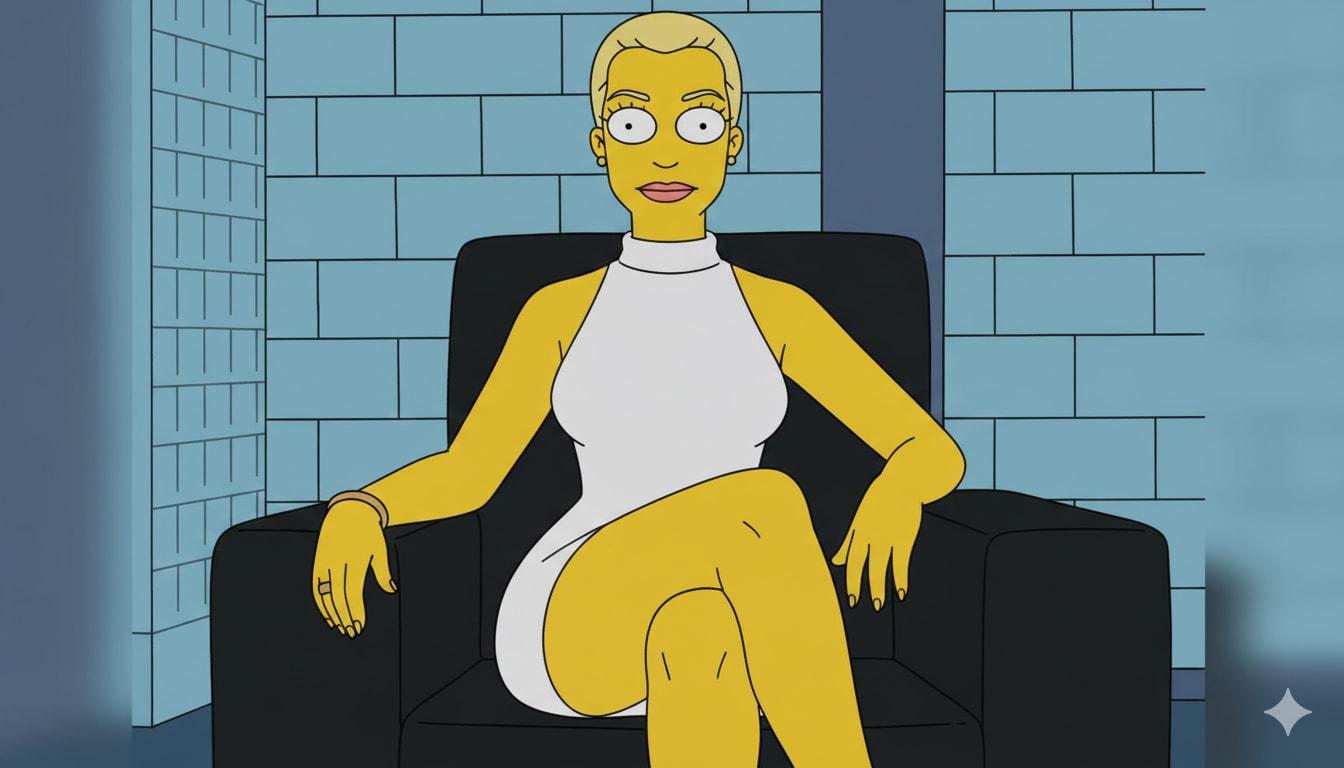
This is an example image generated using this prompt.
Related Prompts
Customizable Avatar Style Generator
Generate avatars in any style you desire. Upload a photo and choose a style to create a personalized avatar.
Digital Visiting Card Product Architect
Design and develop a scalable, web-based digital visiting card application focusing on UX and full-stack engineering for individuals, businesses, and corporate teams.
Hyper-Realistic Clay Bust From Photo Template
A template prompt that transforms the uploaded photo into a hyper-realistic modeling clay bust (head, neck, upper shoulders), preserving identity and expression. It enforces real clay texture, subtle fingerprints and imperfections, and a clean studio product-photo setup for a believable physical sculpture look.
Ultra-Realistic Noir Portrait Creation
Generate an ultra-realistic black-and-white portrait in dramatic low-key lighting based on your uploaded photo. Perfect for creating a vintage noir or luxury-brand aesthetic.